Turn study time
into an adventure.
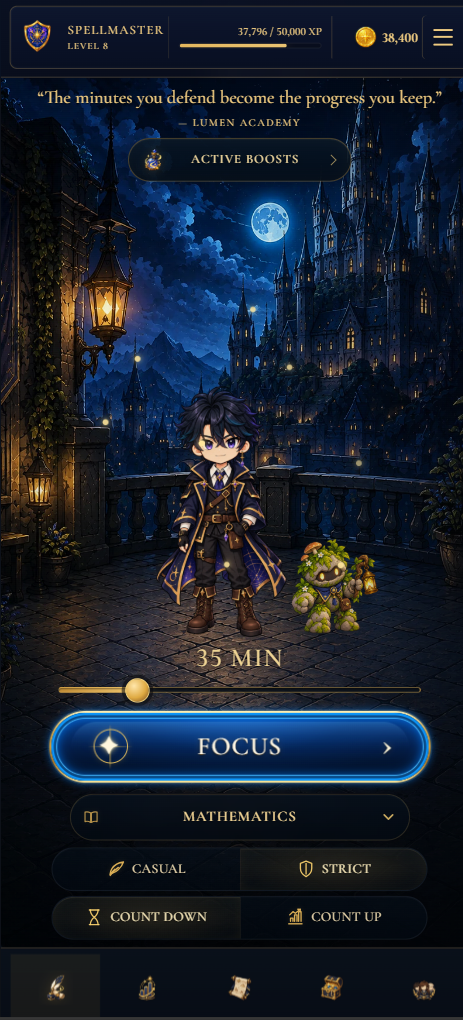
Build better study habits with a flexible focus timer, motivating quests, progress tracking and group study goals. Every session moves your story forward.
Focused minutes, shared momentum.
Every real focus session adds to the story. These privacy-safe totals are updated from verified Lumen Academy study activity.
Loading verified community totals…
Tools for focus, habits and studying together
Explore practical ways to plan focused sessions, build a repeatable study routine and stay accountable with friends.
Flexible study timer
Use countdown, count-up, casual or strict focus sessions for revision, assignments and deep work.
Explore the study timer → 02Better study habits
Turn small, repeatable sessions into visible streaks, subject progress and a routine that lasts.
Build a study routine → 03Group study goals
Create an Academy, study alongside trusted Allies and contribute focused time toward shared goals.
Discover group study →A simple ritual for better study
Lumen turns the work you already need to do into a world you want to return to.

Choose your focus
Set your subject, select a timer and begin a distraction-free session.

Complete the quest
Finish meaningful study sessions to earn XP, coins and quest progress.

Build your legacy
Grow your rank, unlock rewards and watch consistent effort take shape.
See study time become an adventure.
Take a quick tour of the focus timer, rewards, progress tracking and Academies—then step into the app when you’re ready.
Open Lumen AcademyA two-minute tour · Tap play to watch
Your entire study journey,
in one world.
Built to help you start, stay consistent and see the progress that ordinary timers leave invisible.
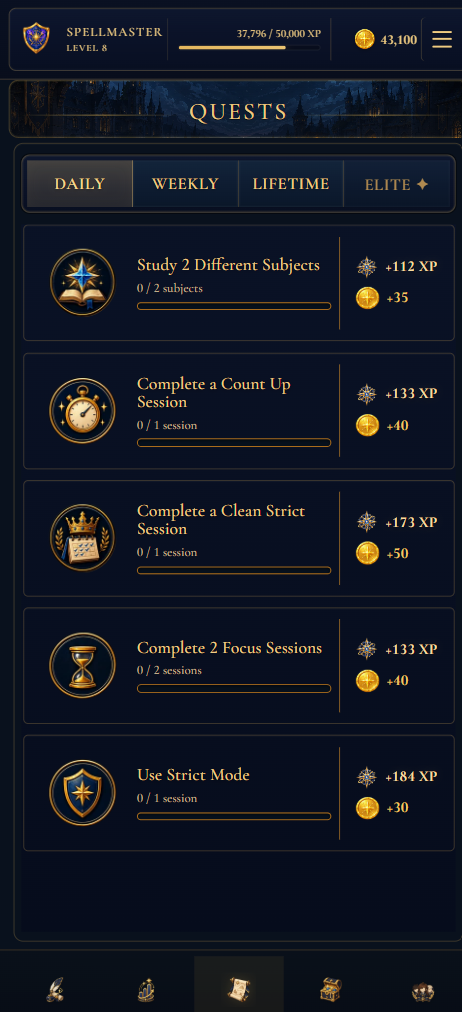
Progress you can feel.
Turn focused study into daily, weekly and lifetime and Elite quests with meaningful XP and coin rewards.
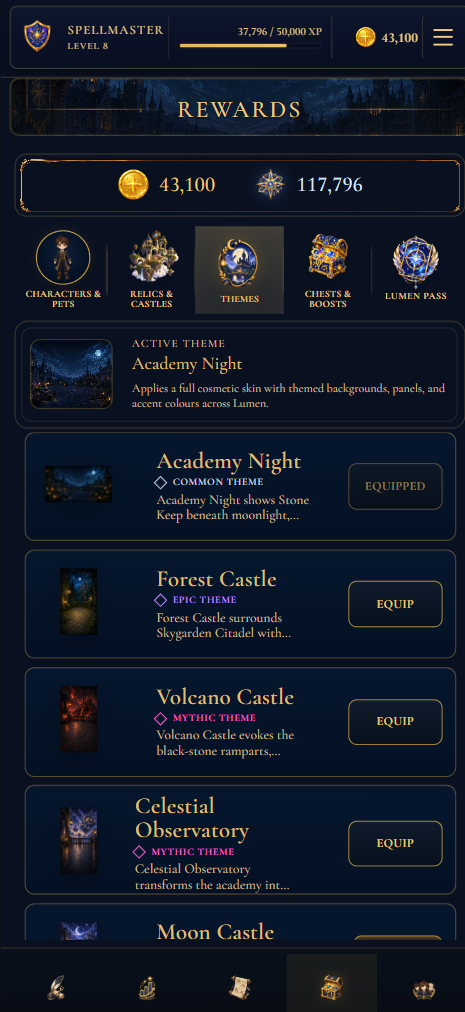
Make the Academy your own.
Unlock characters, pets, relics and themes as your focused study builds lasting progress. Lumen Pass also includes premium progression tools and the ability to add up to one hour of missed study time each week.
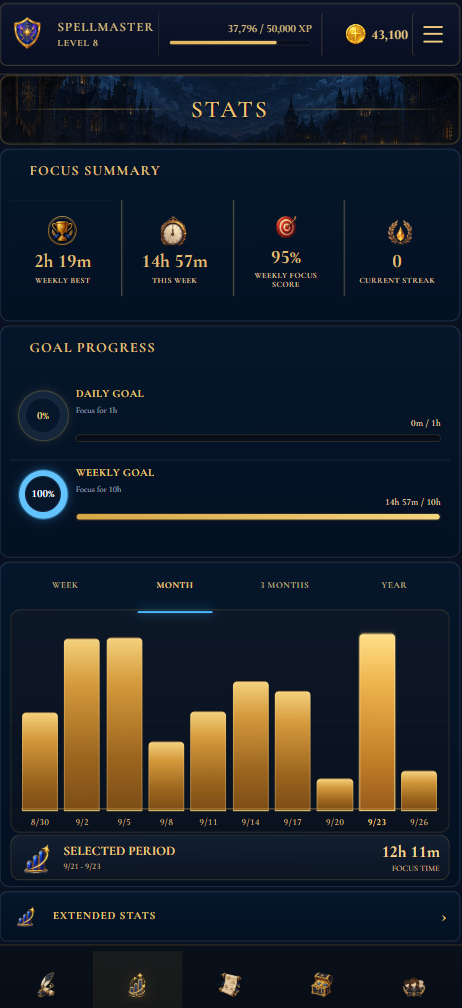
See the habit forming.
Track time, streaks, subjects and consistency without turning study into a spreadsheet.

Move forward together.
Join an Academy, find trusted Allies and contribute to shared study goals.

“Great things are done by a series of small things brought together.”Vincent van Gogh
Your Academy,
wherever you study.
Open Lumen instantly in your browser or add it to your home screen for an app-like experience. Your progress syncs across devices when you sign in.
Your progress belongs to you.
Lumen is designed to support your study—not distract from it. Clear controls keep your account, analytics and social experience in your hands.
- ◇Optional analyticsUsage analytics are off by default and controlled in Settings.
- ◇Account deletionDelete your account and ordinary account data through the app.
- ◇Social safetyVerified-email gates plus report, block and moderation controls.
Built with learners, not invented praise.
Real scholars can share their experience. Reviews appear here only with their permission and after moderation.
What helped you begin?
Tell us whether the focus ritual made starting a study session easier.
What kept you returning?
Share how quests, progress, rewards or Academies affected consistency.
What should improve?
Honest criticism is welcome and helps shape the next release.
Using the early release? Share a review here without leaving the landing page. An administrator checks every submission before it can appear publicly.
Before you enter the Academy
Why use Lumen Academy?
Lumen makes it easier to begin, stay consistent and see your effort adding up. Flexible focus modes support the way you study, while quests, goals, statistics, rewards and Academies turn isolated sessions into a motivating long-term journey.
What kind of study timer does Lumen use?
Lumen includes flexible countdown and count-up timers. Choose a short Pomodoro-style focus interval, set a longer deep-work session, or count upward when you do not know how long a task will take. Casual and strict modes let you choose how much structure you need.
Can I use Lumen for group study?
Yes. Academies give trusted groups a shared place to contribute study time, pursue team goals and recognise consistent participation while each member keeps control of their own focus sessions.
Is Lumen Academy free to use?
Yes. The core study timer, progress tracking, quests and Academy features are free to use. Optional Lumen Pass access is A$3.99 monthly or A$19.99 lifetime.
Do I have to install anything?
No. Lumen works directly in a modern browser. Installing it simply adds a home-screen or desktop icon and opens it in its own app-style window.
Can I use Lumen across devices?
Yes. Sign in to synchronise your study progress, Academy membership and owned rewards across supported devices.
Will there be iPhone and Android apps?
Native App Store and Google Play releases are planned. The installable web app is the complete first release and works on both platforms today.
How do I remove my data?
Account deletion is available from Settings and through the standalone deletion page. You can also contact support if deletion cannot be completed.
YOUR NEXT CHAPTER AWAITS
Ready to begin?
Enter the Academy and make your next focused minute the first step of a larger journey.
Enter Lumen Academy